4.2app.md
6.82 KB
预支付接口说明
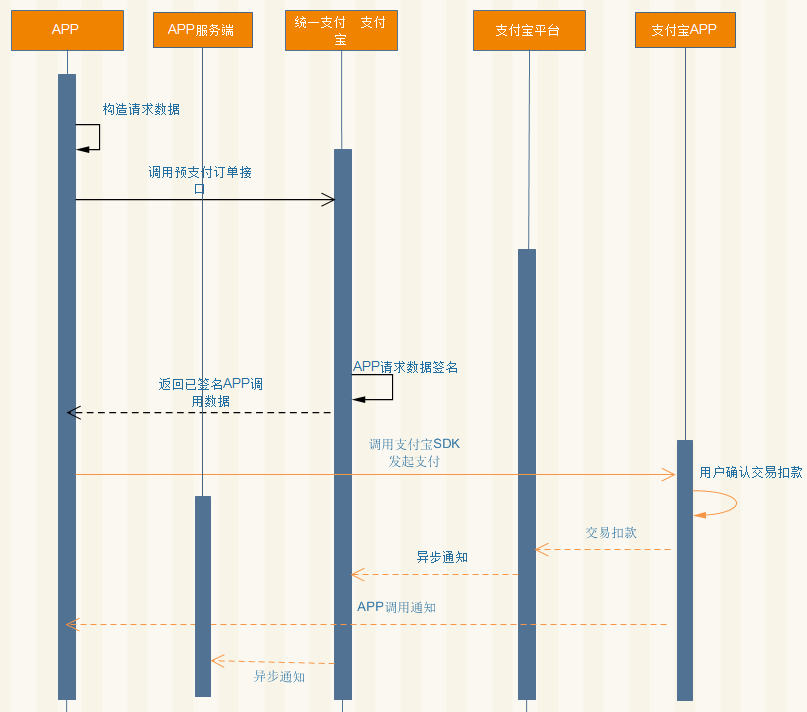
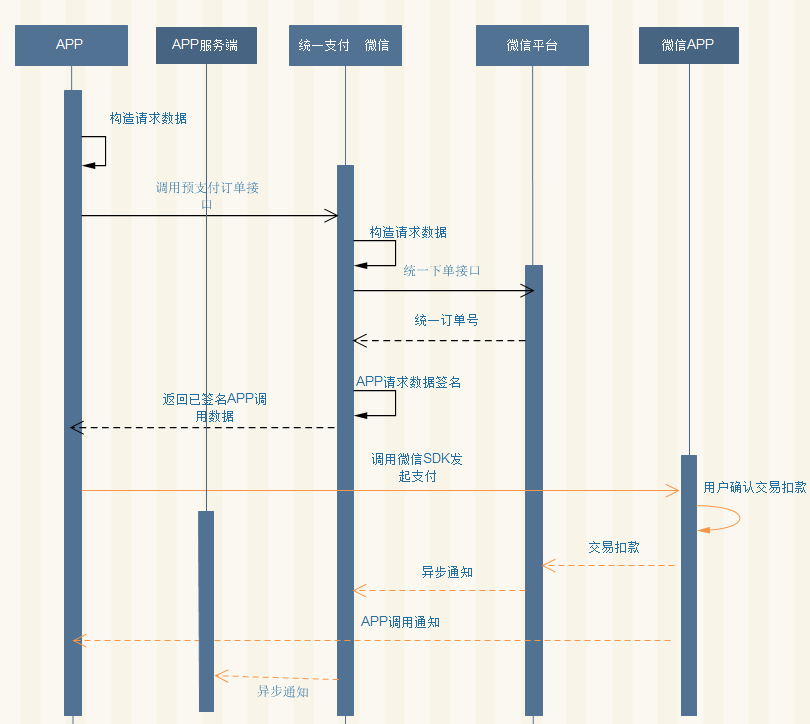
预支付 根据account、type参数找到对应配置,并根据第三方支付平台进行相应的接口调用以及数据处理后,返回给app端直接可用数据。
微信接入
交互图
接入配置
| param | 说明 | 备注 |
|---|---|---|
| appid | 应用id | 微信开放平台中获取 |
| mch_id | 商户号 | 微信商户平台中获取 |
| key | 支付key | 微信商户平台中获取 |
| API 调用文件 | API 调用安全文件 | 用于退款,微信商户平台中获取。 |
将以上信息以邮件提交到 liyi@cnlive.com ,以视讯云登录用户的邮箱发送。
demo
IOS
1) 生成支付云预支付订单所需参数sign,将预支付订单的参数列表中必传参数(sign参数除外)和非必传参数(根据业务需求自行判断需传哪些参数)拼接成参数字典
NSDictionary *parameter = @{ @"account":account, //和支付云对接app支付对应的命名一致 如: @"testDemoAlipay"
                            @"type": @"3",//以支付宝为例
                             @"appId":AppId, //AppID
                            @"out_trade_no":outTradeNo, //唯一订单号
                            @"total_fee":totalFee, //订单总价
@"notify_url":notifyUrl, //回调地址(用户付款通知业务系统接收地址)
                            @"body":body, //订单信息
@"user_id":userId, //用户id
                            @"attach.value":descript, //商品描述
                            @"attach.sid":userId, //用户id
                            @"attach.orderId":outTradeNo//唯一订单号
                        };
//将此参数字典parameter按照ASCII码值从小到大排序,并拼接AppKey如: d8da4312037a6aaff83dc8809c023fc9b06847a3f130e5得到string
//注意:所有参数的值均不能为空,若参数值为空则参数字典去除此键值对.

NSString *string = [NSString stringWithFormat:@"%@&key=%@", [self signvalue:parameter], AppKey];

- (NSString *)signvalue:(NSDictionary*)parameter
{
    //对所有传入参数按照字段名的 ASCII 码从小到大排序
    NSArray *keyArr=[parameter allKeys];
    NSArray *arr = [keyArr sortedArrayUsingSelector:@selector(compare:)];
    NSMutableString *string1 = [[NSMutableString alloc]init];
    for (int i=0; i<arr.count; i++) {
        NSString *parameterString = parameter[[arr objectAtIndex:i]];
        if (parameterString.length > 0) {
            [string1 appendString:[NSString stringWithFormat:@"%@=%@&",[arr objectAtIndex:i],parameter[[arr objectAtIndex:i]]]];
        }
    }
    if (string1.length > 0) {
        [string1 deleteCharactersInRange:NSMakeRange(string1.length-1, 1)];
    }
    return string1;
}
2)将步骤1中得到的string进行SHA1加密并全部大写即得到sign签名字符串,需要导入文件
#import<CommonCrypto/CommonDigest.h>

NSString *signString = [[self sha1:string] uppercaseString];

- (NSString*)sha1:(NSString *)string
{
    NSData *data = [string dataUsingEncoding:NSUTF8StringEncoding];
    uint8_t digest[CC_SHA1_DIGEST_LENGTH];
    CC_SHA1(data.bytes, (int)data.length, digest);
    NSMutableString* output = [NSMutableString stringWithCapacity:CC_SHA1_DIGEST_LENGTH * 2];
    for(int i = 0; i < CC_SHA1_DIGEST_LENGTH; i++)
        [output appendFormat:@"%02x", digest[i]];
    while ([[output substringToIndex:1] isEqualToString:@"0"]) {
        output = [[NSMutableString alloc] initWithString:[output substringFromIndex:1]];
    }
    return output;
}
sign样例: 7656A9FEFB5D8A08AB41723A843FC3C0B3818A0A
3)请求支付云预支付订单接口 预支付订单的参数列表中必传参数(包括生成的sign)和非必传参数(根据业务需求自行判断需传哪些参数)拼接成参数字典,请求预支付订单接口https://api.cnlive.com/open/api2/unifypay/prepay 将支付云返回数据解析(支付宝为例),需导入头文件
#import<AlipaySDK/AlipaySDK.h>

NSDictionary *parameters = @{@"account":account, //和支付云对接app支付对应的命名一致 如: @"testDemoAlipay"
                             @"type":@"3",//以支付宝为例
                             @"appId":AppId, //AppID
                             @"out_trade_no":outTradeNo, //唯一订单号
                             @"total_fee":totalFee, //订单总价
                             @"notify_url":notifyUrl, //回调地址(用户付款通知业务系统接收地址)
                             @"body":body, //订单信息
@"user_id":userId, //用户id
                             @"attach.sid":userId, //用户id
@"attach.orderId":outTradeNo, //唯一订单号
@"attach.value":descript,//商品描述
                        @"sign":signString//RSA加密签名串
                         };

__block NSString *signedString = @"";
[[AFHTTPRequestOperationManager manager] POST:prepay parameters:parameters success:^(AFHTTPRequestOperation *operation, id responseObject) {
    if ([[NSString stringWithFormat:@"%@", responseObject[@"errorCode"]] isEqualToString:@"0"])
    {
         signedString=responseObject[@"data"][@"alipay_app"];
         NSString *orderString = nil;
         NSString *appScheme = @"testDemo您的app包名";
         if (signedString != nil) {
            orderString = signedString;

         [[AlipaySDK defaultService] payOrder:orderString fromScheme:appScheme callback:^(NSDictionary *resultDic) {
            NSString *resultStr = [resultDic objectForKey:@"resultStatus"];
         if ([resultStr isEqualToString:@"9000"]) {
           //PaySuccess支付成功
         }
         else if ([resultStr isEqualToString:@"6001"]) {
         //UserCancel用户取消
         }
         else {//PayFailure支付失败
         }
      }];
      } failure:^(AFHTTPRequestOperation *operation, NSError *error) {
}];
4) AppDelegate.m中添加支付结果客户端回调判断
- (BOOL)application:(UIApplication *)application openURL:(NSURL *)url sourceApplication:(NSString *)sourceApplication annotation:(id)annotation{
    if ([url.host isEqualToString:@"safepay"]) {//支付宝支付结果
        [[AlipaySDK defaultService] processOrderWithPaymentResult:url standbyCallback:^(NSDictionary *resultDic) {
            NSLog(@"result = %@",resultDic);
            NSString *resultStr = [resultDic objectForKey:@"resultStatus"];
if ([resultStr isEqualToString:@"9000"]) {
//PaySuccess
            }
else if ([resultStr isEqualToString:@"6001"])
{//UserCancel
            }
else {
//PayFailure
            }
        }];
        return YES;
    }
    return NO;
}
Android
支付宝接入
交互图